



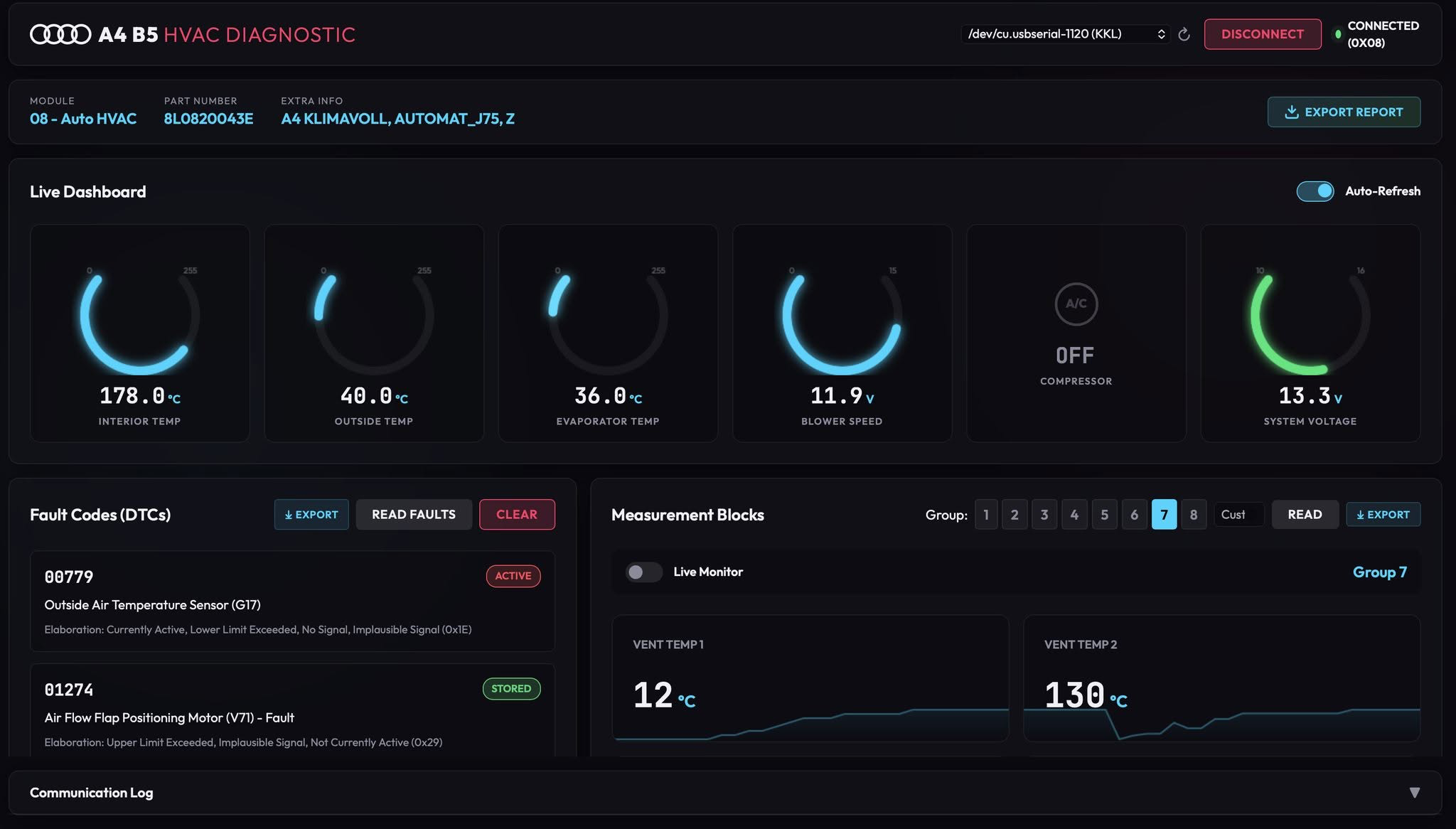
A modern, web-based diagnostic and reverse-engineering tool for the Audi A4 B5 (1994-2001) Auto HVAC (Climate Control) module over the vintage KWP1281 protocol. Connect to your vehicle using a standard KKL (FTDI) diagnostic cable to read faults, stream live measurement blocks, and visualize sensor data on an interactive dashboard.
Key Features
Modern Web Dashboard
- Glassmorphism UI: A sleek, dark-themed automotive dashboard accessible directly via a web browser.
- Port Auto-Detection: Automatically scans and connects to your KKL/FTDI serial port.
Live Data & Gauges
- Real-Time Arc Gauges: Monitor vital systems like Compressor Status, System Voltage, and Cabin/Outside/Evaporator Temperatures.
- Live Data Monitor: Stream sensor data using Server-Sent Events (SSE) with real-time sparkline charts.
- Measurement Blocks: View raw and decoded sensor data across all 8 HVAC measurement groups utilizing 70+ VAG mathematical formulas.
Interactive Sensor Map
- 2D Car SVG Diagram: See the exact physical location of every HVAC sensor (G17, G56, G65, G86, G89, G107, G263) and flap motor (V68, V70, V71, V85).
- Health Indicators: Sensor dots dynamically change color (Cyan = Normal, Orange = Warning, Red Pulsing = Fault/Open Circuit, e.g., -49°C readings).
Diagnostics & Export
- Read & Clear Faults (DTCs): Built-in database of HVAC-specific fault codes with detailed status elaborations (Active, Stored, Intermittent).
- Export to JSON: Export full diagnostic reports (DTCs + Measurement Blocks) tailored for analysis by AI tools.
Requirements
Hardware
- A genuine FTDI FT232RL based KKL VAG-COM cable.
Warning: Cheap clone chips often struggle with the precise 5-baud timing required to wake up the ECU.
- An Audi A4 B5 (8D2) or similar era VAG vehicle with a compatible Climate Control module (Address
0x08).
Software
- Python 3.9+
- Pip package manager
Installation & Setup
- Clone this repository:
git clone git@git.muradjabir.com:muradjabir/audi_8d2_diag.git - Install the required Python dependencies:
pip install -r requirements.txt
(This project usespyserialfor hardware communication andFlaskfor the web server).
Usage
- Plug in: Connect your KKL cable to your vehicle's OBD-II port.
- Power up: Turn the ignition to the ON position (the engine does not need to be running, but the climate control must have power).
- Connect to PC: Plug the KKL cable into your computer's USB port.
- Start the Server:
python3 app.py - Launch Dashboard: Open your web browser and navigate to
http://127.0.0.1:5000. - Select your port from the dropdown and click Connect.
Technical Details
- Protocol: KWP1281 (Key-Word Protocol 1281) via K-Line (ISO 9141).
- Initialization: 5-baud "slow init" bit-banging via standard UART Break signals.
- Module Address:
0x08(Auto HVAC). - Communication: Byte-level complement acknowledgement system.
- Keep-Alive: Automatic background polling to prevent ECU timeouts.
Safety Warning
CAUTION: This tool communicates directly with vehicle electronics on the K-Line. While it is designed to be read-only (with explicit confirmation required for clearing faults), using incorrect or cheap counterfeit cables can potentially introduce noise on the K-Line or cause communication errors. Do not use this tool while the vehicle is in motion. Use at your own risk.